PCOS & MENSTRUAL HEALTH, TOGETHER

Your PCOS & period tracker. Your everyday companion.

Meet PMOS: track your periods and symptoms, explore recipes and gentle movement, and bring your personal history to your next doctor visit. All in one app.

Made for real life with PCOS and irregular cycles.
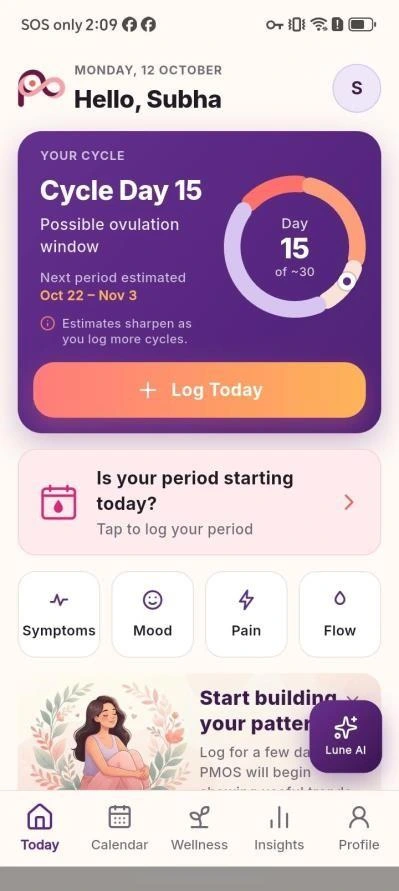
PMOS Today screen with cycle day, estimated period timing and daily check-in
Your cycle,
in one place.
Period dates + daily logs
What fits
your day?
Food · movement · rest
PMOS APP / TODAY
PCOS & period tracking Daily symptom logs Food & movement Shareable doctor reports
01 / PERIODS & DAILY SYMPTOMS

Period and symptom tracking for life with PCOS.

Keep cycle dates and daily experiences in one place. Record the details you know, revisit your history, and use those notes to prepare your next conversation.

YOUR RECORDED CYCLE

Period tracking that keeps the details together.

Log period start and end dates, flow and spotting. Keep an ongoing period open, update dates when needed, and revisit your history in a calendar.

When your cycle varies, it helps to distinguish the dates you recorded from the dates the app estimates. Phase information adds educational context; it does not confirm ovulation.

Explore period & cycle tracking
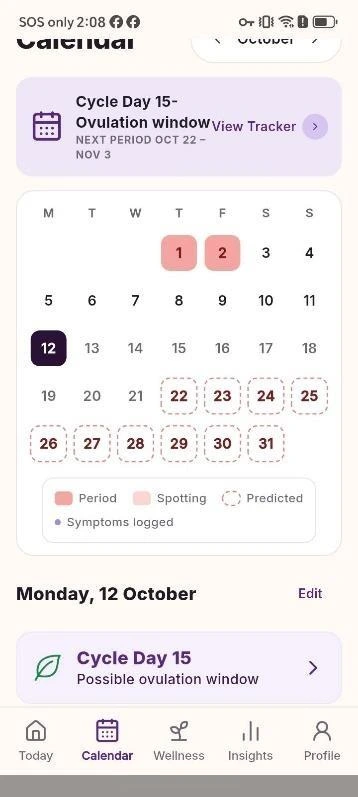
PMOS calendar showing period entries and cycle dates
The cycle calendar
HOW YOU FEEL TODAY

Symptoms, mood and energy deserve space, too.

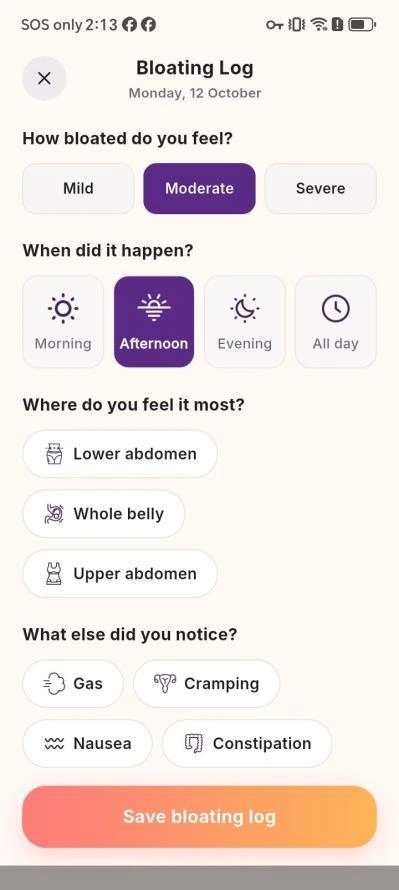
Record pain location, intensity and type alongside mood, stress, energy, brain fog and bloating. Add observations such as flow, discharge, bowel changes, temperature, acne or hair shedding.

Choose the details that are useful to you. Your logs build a personal record you can review over time and include in selected doctor reports.

Explore daily symptom logs
PMOS bloating log with severity, time, location and related symptoms
A detailed bloating log

Start with the details you know. A personal record supports a conversation with a healthcare professional; it does not diagnose the cause of a symptom.

02 / RECIPES & FOOD IDEAS

PCOS recipes, ingredient ideas and food scanning.

Explore PCOS-friendly recipes, generate meal ideas from ingredients, and scan a meal for an estimated breakdown. Practical food support, without a one-size-fits-all diet.

BROWSE & ADAPT

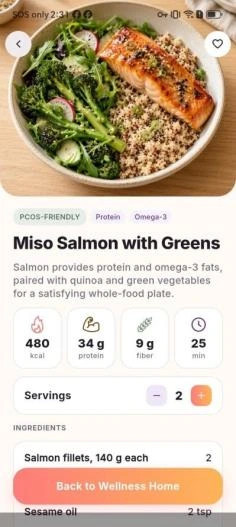
A recipe you can make your own.

Explore preference filters such as high-protein, high-fiber and quick meals. Adjust servings, review ingredients and preparation steps, and find swaps that fit your kitchen.

PMOS recipe details with serving controls, measured ingredients and preparation steps
Servings, ingredients & instructions
START WITH INGREDIENTS

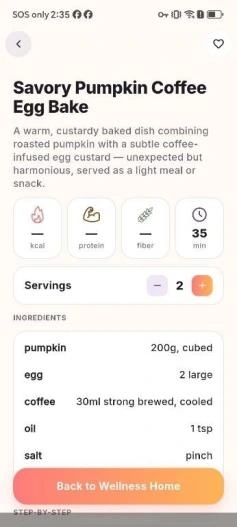
Turn what you have into a meal idea.

Enter available ingredients in the AI recipe assistant. Review a suggested recipe with quantities, servings and instructions, then check it against your allergies and dietary needs.

PMOS AI-generated recipe with serving information, ingredients and preparation details
The AI recipe assistant
TAKE A CLOSER LOOK

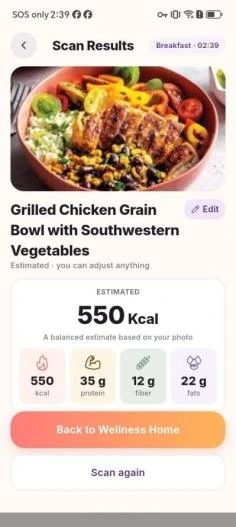
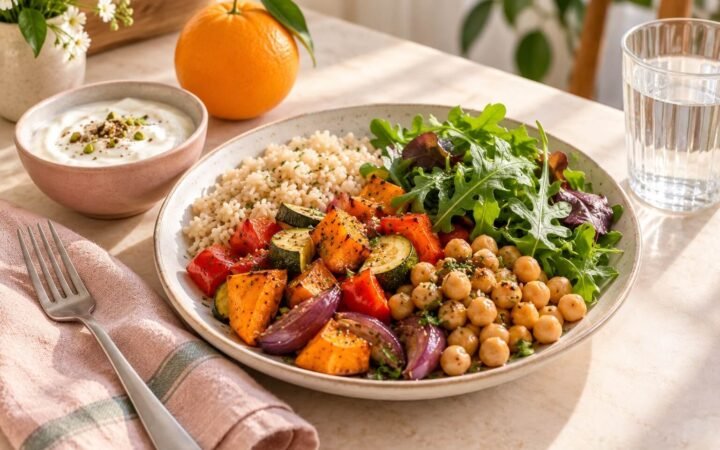
Explore a meal photo with more context.

Food scanning provides an approximate nutrition breakdown, ingredient recognition and gentle suggestions. A photo estimate is a starting point for exploration, rather than an exact measurement.

PMOS food photo scan showing estimated nutrition and ingredients
Photo-based food estimates
03 / MOVEMENT AT YOUR PACE

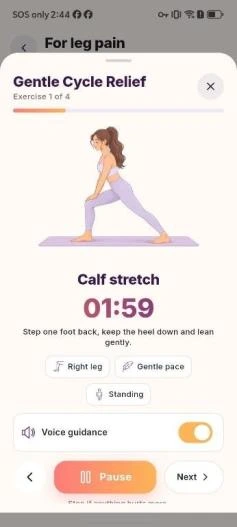
Gentle movement that fits your energy and comfort.

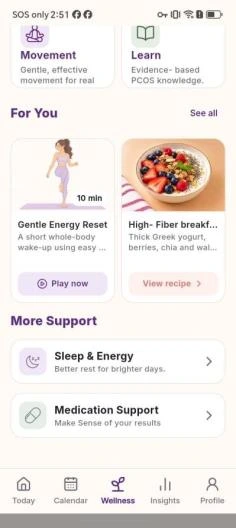
Choose a movement session around how your day feels, then keep completed activity time with the rest of your daily record. The Wellness hub brings those options close to food and routine support.

  • Browse categories for low energy, cramps, bloating, lower back, leg pain and full body.
  • Open a session, start or pause it, and record completed activity time.
  • Return to food, sleep and medication support from the Wellness hub.
Explore gentle movement

Choose movement that fits your comfort and care advice. New, severe or unusual pain needs medical assessment.

PMOS movement library organized by comfort and energy categories
Choose a movement category
PMOS Wellness hub linking recipes, movement, sleep and medication records
Your Wellness hub
04 / INSIGHTS & DOCTOR REPORTS

Turn your tracking history into a doctor visit summary.

Turn your tracking history into a Doctor Visit Summary. Choose your dates and report sections, then share a PDF when you’re ready for the conversation.

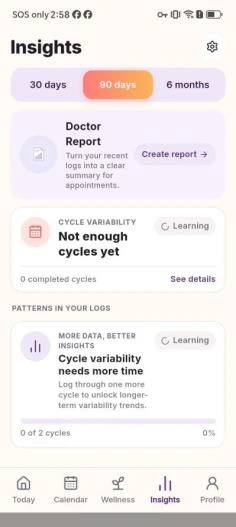
  1. Review the history you have.Explore 30-day, 90-day and six-month views as your tracking records build.
  2. Choose the details to include.Select a date range and sections such as cycle summary, period history, symptoms and pain.
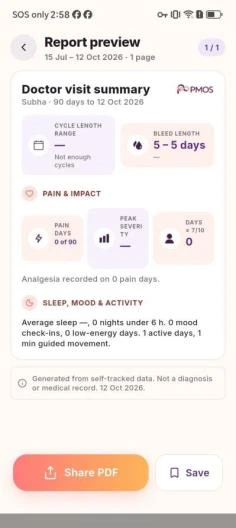
  3. Preview and share a PDF.Check your Doctor Visit Summary before sharing it for an appointment or your own records.
Explore insights & doctor reports
PMOS Insights screen with tracking history and time-range views
Review your tracking history
PMOS Doctor Visit Summary PDF preview with selected tracking sections
Preview your visit summary
05 / THE REST OF YOUR ROUTINE

Sleep, medication reminders and a cycle widget.

Daily routines can be easier to remember when the details stay together. Keep sleep records, medication information and reminder preferences within reach.

Sleep & energy records

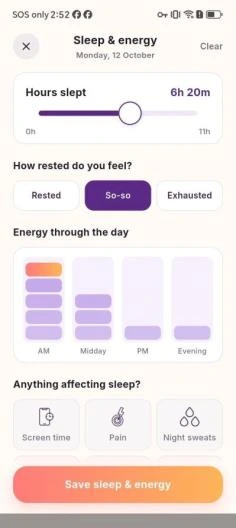
Record sleep duration and keep it alongside daily energy and symptom entries. Return to your own notes when you want to remember how a week felt.

PMOS sleep log with duration and sleep-related entries
Keep a sleep record

Medication & habit reminders

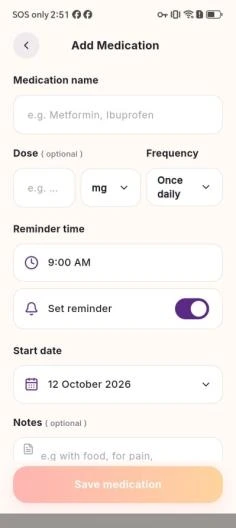
Keep an existing medication name, dose, start date, notes and reminder time together. Manage prompts for the routines you already follow.

PMOS medication record with dose, dates, notes and reminder preferences
Organize existing medication details

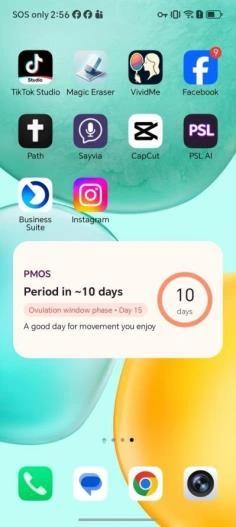
A cycle widget within reach

A home-screen widget gives you a convenient view of cycle information. Your profile also brings personal goals and cycle settings into one place.

PMOS home-screen widget displaying cycle information
Cycle information on your home screen
A CLEARER WAY TO READ YOUR RECORDS

Know what you logged. Know what is estimated.

PMOS brings tracking and everyday support together. Understanding the difference between a record and an estimate helps you use that information in context.

01

Your entries are your history.

Period dates, symptoms, sleep and completed movement reflect the details you recorded. Missing entries can leave gaps; keep uncertainty in mind when looking back.

02

Predictions remain estimates.

Future dates and educational phase information do not confirm ovulation. Irregular cycles can make timing less predictable, and the app is not contraception.

03

Care comes from a professional.

Reports organize selected records for a conversation. The app does not diagnose PCOS, prescribe medication or replace advice from a qualified healthcare professional.

06 / FROM THE BLOG

Articles about PCOS, periods and everyday wellbeing.

Visit the blog for articles about PCOS, periods and everyday wellbeing. Find a topic that matters to you and start reading.

View all blog posts

Latest articles

07 / QUESTIONS ABOUT THE APP

PMOS tracking & feature questions

Can I use PMOS with irregular periods?

Yes. You can record your period dates and symptoms even when your cycle varies. Future dates and cycle phases are estimates; irregular cycles can make timing less predictable.

What symptoms can I track?

Log flow, pain, mood, bloating, bowel movements, discharge and temperature, along with other symptoms such as acne, hair shedding and fatigue. Sleep and movement records keep more of your day in view.

How does the AI recipe feature work?

Enter ingredients you have and the recipe assistant generates a meal idea with quantities, servings, preparation steps and swaps. Recipe discovery and food-photo scanning are also available in the app. Nutrition from a photo is an estimate.

Can I take my records to a doctor?

Yes. Choose a date range and select report sections, including cycle summary, period history, symptoms and pain. Generate a Doctor Visit Summary and use Share PDF.

Does the app confirm ovulation or diagnose PCOS?

No. PMOS supports tracking, education and everyday self-management. Cycle predictions do not confirm ovulation and should not be used as contraception. The app does not diagnose conditions or replace medical care.

Can I track sleep and set reminders?

You can record sleep, save medication details and reminder preferences, manage daily habit reminders, and add a home-screen widget for convenient cycle information.